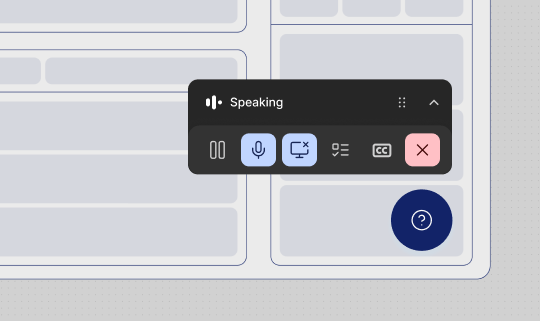
Installing the Quarterzip SDK keeps the entire call experience inside your product. Users launch the agent from your own UI, a draggable mini-player overlays your interface, and picture-in-picture keeps the session alive if they navigate away.
Image
Want to see the SDK in action? Explore the example app.

Do I need an SDK?

Without an SDK, you can still surface your agent via a link that opens in a separate tab. The SDK adds:
  • A call launched from inside your product — no separate tab
  • A draggable mini-player overlaying your UI
  • Picture-in-picture support when users navigate to third-party tools

How does the SDK work?

  1. Launching the call — Users trigger the agent from a button or CTA in your product. A draggable mini-player appears at the bottom of the screen.
  2. Mini-player — The mini-player overlays your UI. Users click Join to start the call.
  3. Microphone permissions — First-time users are prompted to grant microphone access.
  4. Call starts — The agent checks audio and works through the configured goals.
  5. Screen sharing — The user is prompted to share their screen. They can share a tab, window, or full screen.
  6. Guided session — The agent walks the user through goals. They can pause, ask questions, or skip steps at any time.
  7. Picture-in-picture — If the user leaves the tab, a draggable PiP component appears so they can manage the call while navigating elsewhere.
  1. Call summary — When the session ends, the agent summarises what was covered.

How can the agent see the screen?

Quarterzip sees the user’s screen the same way a screen-share works in a video call. Users can share and unshare at any time. Quarterzip never captures screen content without an active share.

Quickstart

The SDK requires a single-page application (SPA). Full page reloads will drop the active call. See the API Reference for environment prerequisites.
Prerequisites
  • A Quarterzip account with at least one agent configured
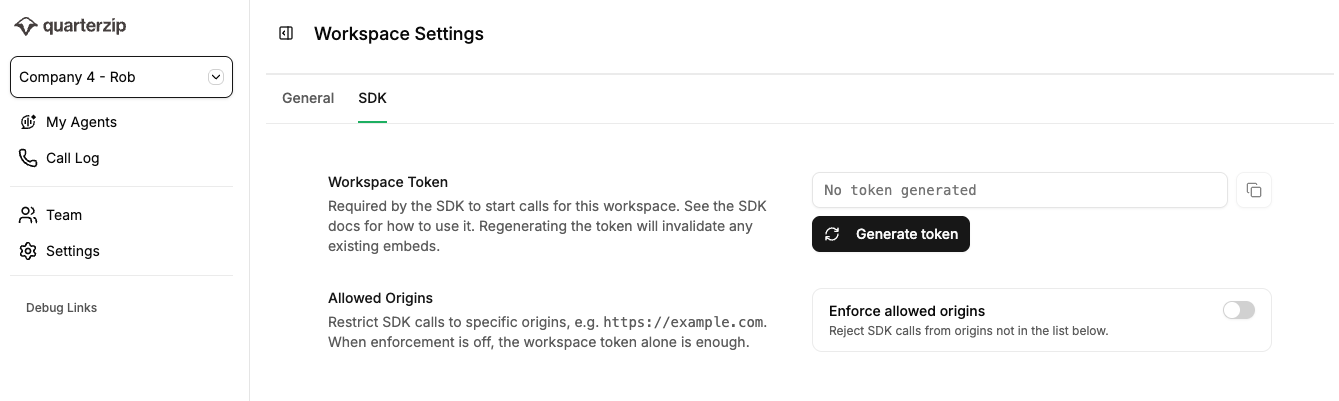
  • Your Workspace Token — found in the Quarterzip app under Settings
  • Your Agent ID — found in the agent URL: https://app.quarterzip.ai/w/{WORKSPACE_ID}/a/{AGENT_ID}
SDK Settings Screenshot

Step 1: Add the SDK script

Paste this snippet before the closing </body> tag on any page where you want the agent available:
<script>
  (function() {
    var q = [];
    window.Quarterzip = {
      _q: q,
      open: function(args) { q.push(['open', args]); },
      close: function(args) { q.push(['close', args]); },
    };
    var s = document.createElement('script');
    s.async = true;
    s.src = 'https://app.quarterzip.ai/sdk/qz.js';
    document.head.appendChild(s);
  })();
</script>
This stubs the Quarterzip object immediately so you can call open() at any time — calls are queued and replayed once the SDK finishes loading.

Step 2: Trigger the agent

Call window.Quarterzip.open() from any user interaction:
window.Quarterzip.open({
  workspaceToken: 'YOUR_WORKSPACE_TOKEN',
  agentId: 'YOUR_AGENT_ID',
  user: {
    email: 'jane@company.com',
    displayName: 'Jane Smith',
    id: 'your_internal_user_id'
  }
});

Step 3: Test it

  1. Open your app in a browser.
  2. Trigger the open() call.
  3. The mini-player should appear — click Join to start the call.
  4. Grant microphone permissions when prompted.
  5. Share your screen to give the agent visual context.
If you see the mini-player, the SDK is installed correctly.

Close the agent programmatically

To end an in-progress call without user input (e.g. on logout):
window.Quarterzip.close();

Advanced patterns

Lazy-loading the SDK

Defer SDK injection until after authentication or a feature check:
function loadQuarterzipSDK() {
  if (window.Quarterzip?._loaded) return;

  var q = [];
  window.Quarterzip = {
    _q: q,
    open: function(args) { q.push(['open', args]); },
    close: function(args) { q.push(['close', args]); },
  };

  var s = document.createElement('script');
  s.async = true;
  s.src = 'https://app.quarterzip.ai/sdk/qz.js';
  document.head.appendChild(s);
}

loadQuarterzipSDK();

Multiple entry points

Wire up multiple CTAs with a shared helper:
function launchAgent(agentId) {
  window.Quarterzip.open({
    workspaceToken: 'YOUR_WORKSPACE_TOKEN',
    agentId: agentId,
    user: getCurrentUser(),
  });
}

document.getElementById('fab').addEventListener('click', () => launchAgent('ONBOARDING_AGENT_ID'));
document.getElementById('empty-state-cta').addEventListener('click', () => launchAgent('FEATURE_AGENT_ID'));
document.getElementById('sidebar-help').addEventListener('click', () => launchAgent('SUPPORT_AGENT_ID'));

Auto-opening on page load

Calling open() on page load causes the mini-player to appear immediately — the call does not start until the user clicks Join:
window.Quarterzip.open({
  workspaceToken: 'YOUR_WORKSPACE_TOKEN',
  agentId: 'YOUR_AGENT_ID',
  user: { email: '...', displayName: '...', id: '...' },
});
This is particularly useful in sandbox or trial environments where users are expected to onboard straight away.

Closing on route change

End the call when a user navigates away from a specific area (React Router v6 example):
import { useEffect } from 'react';
import { useLocation } from 'react-router-dom';

function useCloseAgentOnLeave(protectedPaths = []) {
  const location = useLocation();
  useEffect(() => {
    const isProtected = protectedPaths.some(p => location.pathname.startsWith(p));
    if (!isProtected) window.Quarterzip?.close();
  }, [location.pathname]);
}

useCloseAgentOnLeave(['/onboarding']);

Gating by user segment

Only show the agent to users who haven’t completed onboarding:
function maybeOpenAgent() {
  const user = getCurrentUser();
  if (user.onboardingComplete) return;

  window.Quarterzip.open({
    workspaceToken: 'YOUR_WORKSPACE_TOKEN',
    agentId: 'YOUR_AGENT_ID',
    user: { email: user.email, displayName: user.displayName, id: user.id },
  });
}

Passing context to the agent

Use the context parameter to pass information about the user — plan, country, handover notes from Intercom, etc. The agent receives this at the start of the call.
window.Quarterzip.open({
  workspaceToken: 'YOUR_WORKSPACE_TOKEN',
  agentId: 'YOUR_AGENT_ID',
  user: { email: user.email, displayName: user.displayName, id: user.id },
  context: `Plan: ${user.plan}. Country: ${user.country}.`,
});
Context is capped at 2,000 characters.

React wrapper hook

import { useCallback } from 'react';
import { useCurrentUser } from '../hooks/useCurrentUser';

export function useQuarterzip(agentId) {
  const user = useCurrentUser();

  const open = useCallback(() => {
    window.Quarterzip?.open({
      workspaceToken: process.env.REACT_APP_QUARTERZIP_TOKEN,
      agentId,
      user: { email: user.email, displayName: user.displayName, id: user.id },
    });
  }, [agentId, user]);

  const close = useCallback(() => window.Quarterzip?.close(), []);

  return { open, close };
}

Feature flags

import { useFeatureFlagEnabled } from 'posthog-js/react';

function OnboardingCTA() {
  const enabled = useFeatureFlagEnabled('quarterzip-sdk');
  if (!enabled) return null;

  return (
    <button onClick={() => window.Quarterzip.open({
      workspaceToken: 'YOUR_WORKSPACE_TOKEN',
      agentId: 'YOUR_AGENT_ID',
      user: { /* ... */ },
    })}>
      Get guided help
    </button>
  );
}