> ## Documentation Index
> Fetch the complete documentation index at: https://docs.quarterzip.ai/llms.txt
> Use this file to discover all available pages before exploring further.
# SDK
New to Quarterzip? Be sure to visit the [Getting Started](/getting-started) page before continuing with this section.
## Quickstart Plan
1. [Configure your Quarterzip Workspace for SDK](#configure-your-quarterzip-workspace-for-sdk)
2. [Install the Quarterzip SDK](#install-the-quarterzip-sdk)
3. [Grant Security Permissions](#grant-security-permissions)
4. [Trigger the Quarterzip Agent](#trigger-the-quarterzip-agent)
## Configure your Quarterzip Workspace for SDK
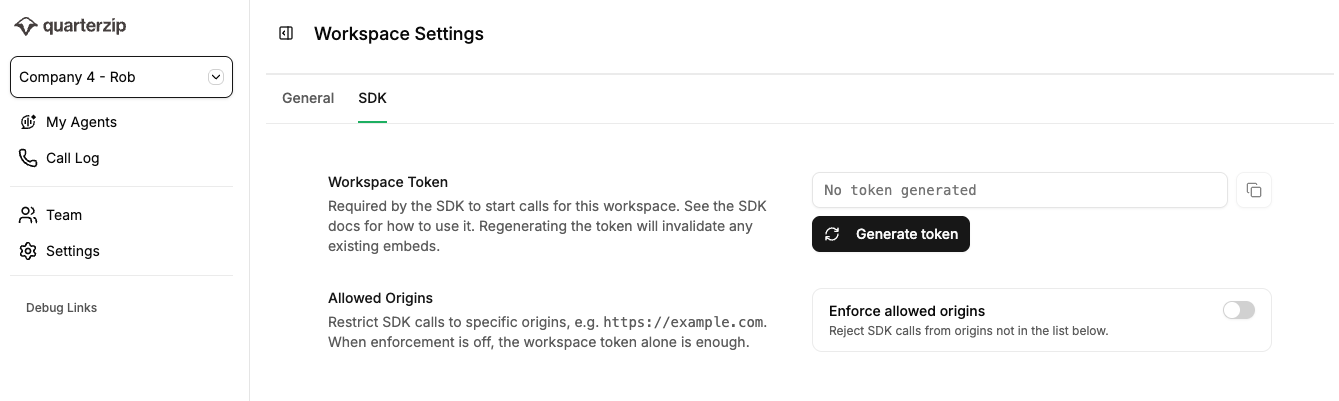
Visit the SDK Settings (`Settings -> SDK`) in your Quarterzip workspace. This page provides the configuration options to restrict *who* may serve your agent on your behalf.
* **Workspace Token:** a public token used to authenticate your site to Quarterzip.
* **Allowed Origins:** an optional list of site origins that are authorised to serve your Quarterzip agent. This list may include wildcards for subdomains, i.e. `https://*.example.com`
Then visit the My Agents page and select your agent.
* **Agent ID:** A 6 alpha-numeric character ID to identify your agent. Select the menu button in the top right and click share my agent. From here, the agent\_id is the 6 alpha-numeric characters at the end of the url, after the `/d/` .
## Install the Quarterzip SDK
### CDN Script
```javascript theme={null}
```
### NPM Package
The CDN Script is the recommended installation method for Quarterzip. Please contact support before using this NPM package installation.
```shellscript theme={null}
pnpm add @quarterzip.ai/sdk
```
## Grant Security Permissions
The Quarterzip SDK operates in a security sandbox separate from your site. In order for your Quarterzip agent to communicate with your users, the following permissions must be granted if enforced.
### **CSP requirements**
Only relevant if your page sends a `Content-Security-Policy` header, then it must permit Quarterzip's SDK origin to be framed.
```text theme={null}
Content-Security-Policy:
frame-src https://sdk.quarterzip.ai;
child-src https://sdk.quarterzip.ai;
```
### **Permissions Policy**
Only relevant if your page sends a `Permissions-Policy` header, then it must permit Quarterzip's SDK origin the following permissions:
```text theme={null}
Permissions-Policy:
microphone=(self "https://sdk.quarterzip.ai"),
display-capture=(self "https://sdk.quarterzip.ai"),
autoplay=(self "https://sdk.quarterzip.ai"),
speaker-selection=(self "https://sdk.quarterzip.ai"),
storage-access=(self "https://sdk.quarterzip.ai")
```
Learn more at [Security](/security).
## Trigger the Quarterzip Agent
Call `window.Quarterzip.open()` from any user interaction; i.e. a button-press. Visit [SDK API Reference](/sdk/api) for more details.
```jsx CDN theme={null}
window.Quarterzip.open({
workspaceToken: 'YOUR_WORKSPACE_TOKEN',
agentId: 'YOUR_AGENT_ID',
user: {
id: 'your_internal_user_id'
email: 'jane@company.com',
displayName: 'Jane Smith',
}
});
```
```jsx NPM theme={null}
Quarterzip.open({
workspaceToken: 'YOUR_WORKSPACE_TOKEN',
agentId: 'YOUR_AGENT_ID',
user: {
id: 'your_internal_user_id'
email: 'jane@company.com',
displayName: 'Jane Smith',
}
});
```
It's important to verify integration by conducting a call with the agent; completing expected steps such as granting microphone permissions, screen-sharing and ending the call.
Set yourself up for success.
React and receive call data.
## Advanced patterns
### Passing additional context to the agent
The `context` parameter may be used to provide additional information to the agent to enhance the conversation; e.g. the user's plan, country, or handover notes from another support tool. The agent only receives this information if the user decides to start the call. The amount of context is capped at **2,000** characters.
```jsx CDN theme={null}
window.Quarterzip.open({
workspaceToken: 'YOUR_WORKSPACE_TOKEN',
agentId: 'YOUR_AGENT_ID',
user: { id: user.id, email: user.email, displayName: user.displayName },
context: `Plan: ${user.plan}. Country: ${user.country}.`,
});
```
```jsx NPM theme={null}
Quarterzip.open({
workspaceToken: 'YOUR_WORKSPACE_TOKEN',
agentId: 'YOUR_AGENT_ID',
user: { id: user.id, email: user.email, displayName: user.displayName },
context: `Plan: ${user.plan}. Country: ${user.country}.`,
});
```
### Conditionally present Quarterzip agents
Most customers prefer to show agents to users based on feature-flags or user-attributes.
Screen-sharing requires the user's browser to have the `getDisplayMedia()` web API, which is unavailable on most mobile devices and can help determine which users to filter out.
```javascript CDN theme={null}
import { useFeatureFlagEnabled } from 'posthog-js/react';
function maybeOpenAgent() {
// Feature-flag Quarterzip agent
const enabled = useFeatureFlagEnabled('quarterzip-sdk');
if (!enabled) return null;
// Does browser support screen-sharing
const canScreenShare = !!(navigator.mediaDevices?.getDisplayMedia);
if (!canScreenShare) return null;
// Show Quarterzip agent based on a user-attribute; i.e. first-time visit
const user = getCurrentUser();
if (user.onboardingComplete) return null;
return (
);
}
```
```jsx NPM theme={null}
import { Quarterzip } from '@quarterzip.ai/sdk';
import { useFeatureFlagEnabled } from 'posthog-js/react';
function maybeOpenAgent() {
// Feature-flag Quarterzip agent
const enabled = useFeatureFlagEnabled('quarterzip-sdk');
if (!enabled) return null;
// Does browser support screen-sharing
const canScreenShare = !!(navigator.mediaDevices?.getDisplayMedia);
if (!canScreenShare) return null;
// Show Quarterzip agent based on a user-attribute; i.e. first-time visit
const user = getCurrentUser();
if (user.onboardingComplete) return null;
return (
);
}
```
### Closing on route change
End the call when a user navigates away from a specific area (React Router v6 example):
```jsx CDN theme={null}
import { useEffect } from 'react';
import { useLocation } from 'react-router-dom';
function useCloseAgentOnLeave(protectedPaths = []) {
const location = useLocation();
useEffect(() => {
const isProtected = protectedPaths.some(p => location.pathname.startsWith(p));
if (!isProtected) window.Quarterzip?.close();
}, [location.pathname]);
}
useCloseAgentOnLeave(['/onboarding']);
```
```jsx NPM theme={null}
import { Quarterzip } from '@quarterzip.ai/sdk';
import { useEffect } from 'react';
import { useLocation } from 'react-router-dom';
function useCloseAgentOnLeave(protectedPaths = []) {
const location = useLocation();
useEffect(() => {
const isProtected = protectedPaths.some(p => location.pathname.startsWith(p));
if (!isProtected) Quarterzip?.close();
}, [location.pathname]);
}
useCloseAgentOnLeave(['/onboarding']);
```
### React wrapper hook
```jsx CDN theme={null}
import { useCallback } from 'react';
import { useCurrentUser } from '../hooks/useCurrentUser';
export function useQuarterzip(agentId) {
const user = useCurrentUser();
const open = useCallback(() => {
window.Quarterzip?.open({
workspaceToken: process.env.REACT_APP_QUARTERZIP_TOKEN,
agentId,
user: { email: user.email, displayName: user.displayName, id: user.id },
});
}, [agentId, user]);
const close = useCallback(() => window.Quarterzip?.close(), []);
return { open, close };
}
```
```jsx NPM theme={null}
import { Quarterzip } from '@quarterzip.ai/sdk';
import { useCallback } from 'react';
import { useCurrentUser } from '../hooks/useCurrentUser';
export function useQuarterzip(agentId) {
const user = useCurrentUser();
const open = useCallback(() => {
Quarterzip?.open({
workspaceToken: process.env.REACT_APP_QUARTERZIP_TOKEN,
agentId,
user: { email: user.email, displayName: user.displayName, id: user.id },
});
}, [agentId, user]);
const close = useCallback(() => Quarterzip?.close(), []);
return { open, close };
}
```
## What's Next?
Set yourself up for success.
React and receive call data.
 ## Quickstart Plan
1. [Configure your Quarterzip Workspace for SDK](#configure-your-quarterzip-workspace-for-sdk)
2. [Install the Quarterzip SDK](#install-the-quarterzip-sdk)
3. [Grant Security Permissions](#grant-security-permissions)
4. [Trigger the Quarterzip Agent](#trigger-the-quarterzip-agent)
## Configure your Quarterzip Workspace for SDK
Visit the SDK Settings (`Settings -> SDK`) in your Quarterzip workspace. This page provides the configuration options to restrict *who* may serve your agent on your behalf.
* **Workspace Token:** a public token used to authenticate your site to Quarterzip.
* **Allowed Origins:** an optional list of site origins that are authorised to serve your Quarterzip agent. This list may include wildcards for subdomains, i.e. `https://*.example.com`
## Quickstart Plan
1. [Configure your Quarterzip Workspace for SDK](#configure-your-quarterzip-workspace-for-sdk)
2. [Install the Quarterzip SDK](#install-the-quarterzip-sdk)
3. [Grant Security Permissions](#grant-security-permissions)
4. [Trigger the Quarterzip Agent](#trigger-the-quarterzip-agent)
## Configure your Quarterzip Workspace for SDK
Visit the SDK Settings (`Settings -> SDK`) in your Quarterzip workspace. This page provides the configuration options to restrict *who* may serve your agent on your behalf.
* **Workspace Token:** a public token used to authenticate your site to Quarterzip.
* **Allowed Origins:** an optional list of site origins that are authorised to serve your Quarterzip agent. This list may include wildcards for subdomains, i.e. `https://*.example.com`
 Then visit the My Agents page and select your agent.
* **Agent ID:** A 6 alpha-numeric character ID to identify your agent. Select the menu button in the top right and click share my agent. From here, the agent\_id is the 6 alpha-numeric characters at the end of the url, after the `/d/` .
## Install the Quarterzip SDK
### CDN Script
```javascript theme={null}
```
### NPM Package
Then visit the My Agents page and select your agent.
* **Agent ID:** A 6 alpha-numeric character ID to identify your agent. Select the menu button in the top right and click share my agent. From here, the agent\_id is the 6 alpha-numeric characters at the end of the url, after the `/d/` .
## Install the Quarterzip SDK
### CDN Script
```javascript theme={null}
```
### NPM Package