> ## Documentation Index
> Fetch the complete documentation index at: https://docs.quarterzip.ai/llms.txt
> Use this file to discover all available pages before exploring further.
# SDK
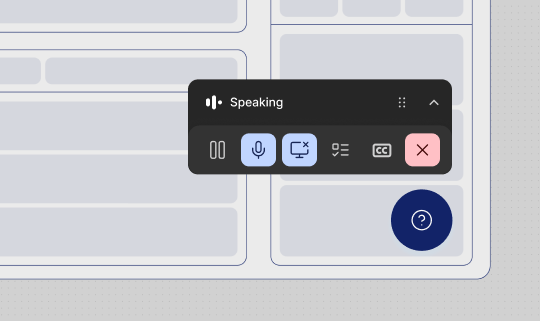
Installing the Quarterzip SDK keeps the entire call experience inside your product. Users launch the agent from your own UI, a draggable mini-player overlays your interface, and picture-in-picture keeps the session alive if they navigate away.
 Want to see the SDK in action? Explore the [example app](https://sdk-example-app.vercel.app/).
## Do I need an SDK?
Without an SDK, you can still surface your agent via a link that opens in a separate tab. The SDK adds:
* A call launched from inside your product — no separate tab
* A draggable mini-player overlaying your UI
* Picture-in-picture support when users navigate to third-party tools
## How does the SDK work?
1. **Launching the call —** Users trigger the agent from a button or CTA in your product. A draggable mini-player appears at the bottom of the screen.
2. **Mini-player —** The mini-player overlays your UI. Users click **Join** to start the call.
3. **Microphone permissions —** First-time users are prompted to grant microphone access.
4. **Call starts —** The agent checks audio and works through the configured goals.
5. **Screen sharing —** The user is prompted to share their screen. They can share a tab, window, or full screen.
6. **Guided session —** The agent walks the user through goals. They can pause, ask questions, or skip steps at any time.
7. **Picture-in-picture —** If the user leaves the tab, a draggable PiP component appears so they can manage the call while navigating elsewhere.
8. **Call summary —** When the session ends, the agent summarises what was covered.
## How can the agent see the screen?
Quarterzip sees the user's screen the same way a screen-share works in a video call. Users can share and unshare at any time. Quarterzip never captures screen content without an active share.
***
## Quickstart
The SDK requires a **single-page application (SPA)**. Full page reloads will drop the active call. See the [API Reference](/sdk-api) for environment prerequisites.
**Prerequisites**
* A Quarterzip account with at least one agent configured
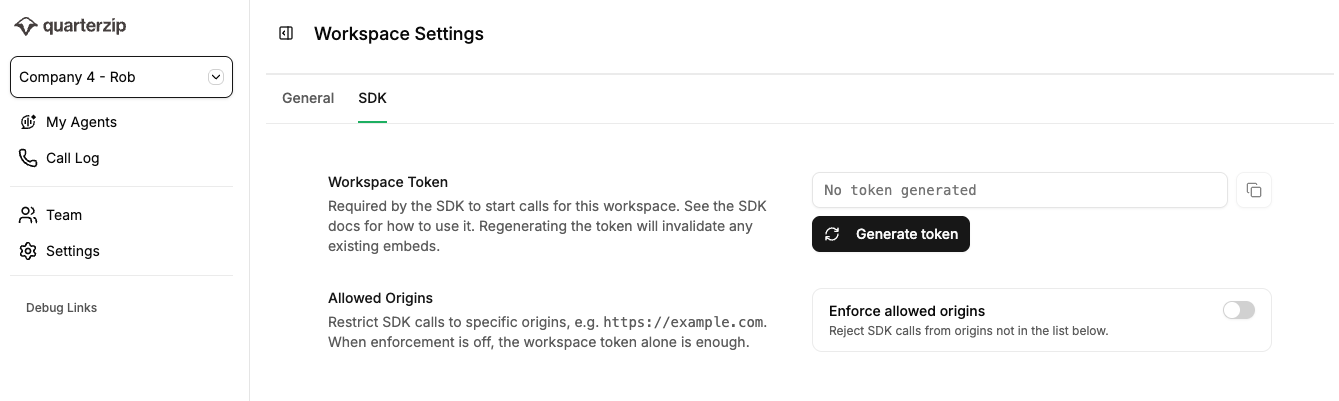
* Your **Workspace Token** — found in the Quarterzip app under Settings
* Your **Agent ID** — found in the agent URL: `https://app.quarterzip.ai/w/{WORKSPACE_ID}/a/{AGENT_ID}`
Want to see the SDK in action? Explore the [example app](https://sdk-example-app.vercel.app/).
## Do I need an SDK?
Without an SDK, you can still surface your agent via a link that opens in a separate tab. The SDK adds:
* A call launched from inside your product — no separate tab
* A draggable mini-player overlaying your UI
* Picture-in-picture support when users navigate to third-party tools
## How does the SDK work?
1. **Launching the call —** Users trigger the agent from a button or CTA in your product. A draggable mini-player appears at the bottom of the screen.
2. **Mini-player —** The mini-player overlays your UI. Users click **Join** to start the call.
3. **Microphone permissions —** First-time users are prompted to grant microphone access.
4. **Call starts —** The agent checks audio and works through the configured goals.
5. **Screen sharing —** The user is prompted to share their screen. They can share a tab, window, or full screen.
6. **Guided session —** The agent walks the user through goals. They can pause, ask questions, or skip steps at any time.
7. **Picture-in-picture —** If the user leaves the tab, a draggable PiP component appears so they can manage the call while navigating elsewhere.
8. **Call summary —** When the session ends, the agent summarises what was covered.
## How can the agent see the screen?
Quarterzip sees the user's screen the same way a screen-share works in a video call. Users can share and unshare at any time. Quarterzip never captures screen content without an active share.
***
## Quickstart
The SDK requires a **single-page application (SPA)**. Full page reloads will drop the active call. See the [API Reference](/sdk-api) for environment prerequisites.
**Prerequisites**
* A Quarterzip account with at least one agent configured
* Your **Workspace Token** — found in the Quarterzip app under Settings
* Your **Agent ID** — found in the agent URL: `https://app.quarterzip.ai/w/{WORKSPACE_ID}/a/{AGENT_ID}`
 ### Step 1: Add the SDK script
Paste this snippet before the closing `` tag on any page where you want the agent available:
```html theme={null}
### Step 1: Add the SDK script
Paste this snippet before the closing `` tag on any page where you want the agent available:
```html theme={null}